
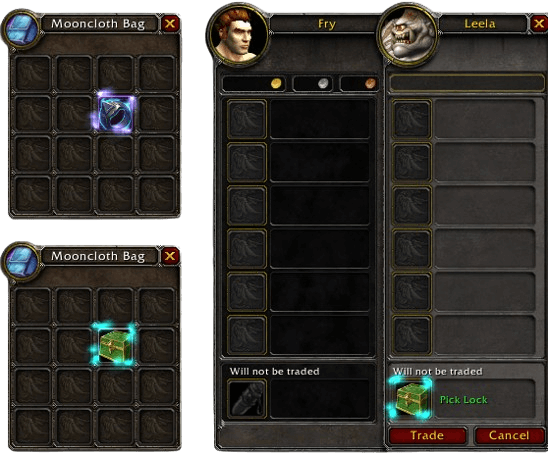
Molinari is a lightweight profession addon that lets you process items directly from your bags without first opening a profession window or selecting the appropriate spell.
It is useful for players who regularly mill herbs, prospect ore, disenchant equipment, or pick locks and want a faster way to perform these repetitive actions.
What Molinari does
Molinari supports several common item-processing actions:
- Milling for herbs
- Prospecting for ore
- Disenchanting eligible equipment
- Lockpicking locked items
Instead of selecting Milling, Prospecting, Disenchanting, or Lockpicking and then clicking an item, Molinari allows you to perform the action directly from your inventory.
How to use Molinari
Hold Alt and left-click an eligible item in your bags.
Molinari detects the item and uses the appropriate available ability automatically. For example, Alt-clicking a suitable herb can start Milling, while doing the same with suitable ore can start Prospecting.
You still need the appropriate profession or ability, and the selected item must meet the normal requirements for that action.
There are no additional steps required for normal use, making Molinari particularly convenient when processing many items after farming or before using the Auction House.
Installation
- Download the Molinari archive.
- Close World of Warcraft.
- Extract the addon into World of Warcraft\Interface\AddOns.
- Start the game and make sure Molinari is enabled in the AddOns menu.
If Alt-clicking does nothing, first check that Molinari is enabled and that your character has the required profession or ability for the selected item.
Molinari keeps item processing simple: open your bags, hold Alt, and click the item you want to process.



