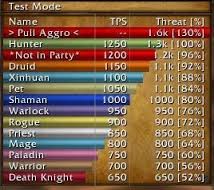
Omen Threat Meter is a threat tracking addon for WoW WotLK 3.3.5a. It shows how much threat you and other group members have generated against an enemy, helping players see who is close to pulling aggro from the tank.
It is particularly useful in raids and dungeons, where losing control of a boss or dangerous enemy can quickly cause a wipe.
How Omen works
During combat, Omen displays group members as threat bars. The higher a player's threat, the closer that player is to becoming the enemy's primary target.
This information is useful for different roles:
- Tanks can check whether they are maintaining a safe threat lead.
- DPS can reduce or stop damage before pulling aggro.
- Healers can see when healing threat puts them at risk.
Omen3 uses World of Warcraft's built-in threat information rather than calculating threat from combat events itself.
Configuration
Omen can appear automatically while you are in a group and fighting enemies.
To open its settings, type:
/omen
or:
/omen config
The options allow you to move and resize the threat window, change its appearance, and configure when it should be shown or hidden.
Installation
- Download the Omen archive.
- Close World of Warcraft.
- Extract the addon into World of Warcraft\Interface\AddOns.
- Start the game and make sure Omen is enabled.
- Join a group and enter combat to check that threat bars appear.
Omen is especially useful for tanks and high-damage players who need a clear real-time view of threat during dungeon and raid encounters.
Before you install
Keep a copy of your current addon folder and saved settings before replacing files. Confirm that the extracted folder is intended for the 3.3.5a client, enable it on the character-selection screen, and test the main feature outside important group content. If the interface behaves unexpectedly, disable unrelated addons temporarily and reload the UI.