
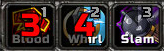
OmniCC is a cooldown text addon that places clear numeric countdowns directly on action buttons and other cooldown icons.
Main features
- numeric cooldown text on buttons.
- scale and threshold controls.
- works with many action-bar and inventory addons.
- automatic handling of cooldown spirals.
How to use
Open /omnicc and choose text size and thresholds that remain readable. The addon then works automatically wherever compatible cooldown frames are shown.
Cooldown text on icons
OmniCC adds numeric cooldown text to action and inventory icons. The supplied package includes OmniCC and OmniCC_Config, so the configuration panel controls the display rather than a separate bar window. Set the minimum duration, font, scale and color thresholds according to how much information should remain visible on a raid action bar.
After changing an option, watch a spell with a long cooldown and a short global cooldown separately. The text is derived from the cooldown state supplied by the client; OmniCC does not make an ability ready, predict charges or replace a spell-alert system. Icons created by an unrelated secure frame may not be hooked if that frame does not expose the expected cooldown API.
Use longer-duration text on major cooldowns and a smaller threshold on short effects. The numbers are most useful when the icon itself identifies the spell and the frame is not hiding the countdown.
Cooldown text is most useful on defensive and interrupt icons that otherwise look ready. Set the display threshold so short global cooldowns do not create visual noise, then verify a long cooldown before a raid.



