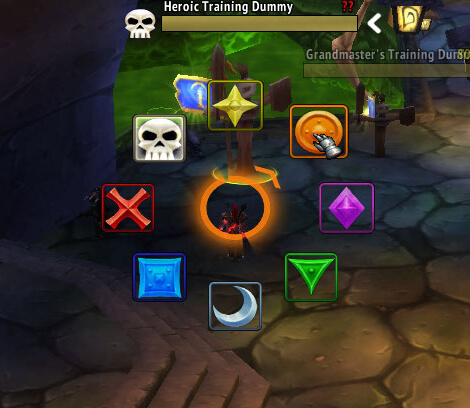
OPie is an action-bar addon for WoW WotLK 3.3.5a that lets you organize spells, items, mounts, macros, and other actions into radial menus called rings.
Instead of keeping every rarely used ability on your action bars, you can place related actions into a ring and open it with a single keybind.
How OPie works
Each OPie ring contains several actions arranged around the mouse cursor.
Hold the assigned key to open a ring, move the cursor toward the action you want, and release the key to select it. This makes frequently accessed groups of abilities available without filling additional action bars.
Rings can be useful for organizing:
- Class abilities
- Profession skills
- Mounts
- Items
- Macros
- Raid markers
You can create different rings for different purposes and assign each one its own keybind.
Configuration
Use:
/opie bind
to configure ring keybinds.
Use:
/opie rings
to create or edit custom rings.
The main OPie configuration can be opened with:
/opie
From there you can adjust how the radial menus behave and customize your rings.
Installation
- Download the OPie archive.
- Close World of Warcraft.
- Extract the addon into World of Warcraft\Interface\AddOns.
- Start the game and make sure OPie is enabled in the AddOns menu.
- Configure your rings and assign convenient keybinds.
OPie is especially useful for abilities and items you need occasionally but do not want permanently occupying space on your main action bars.
Before you install
Keep a copy of your current addon folder and saved settings before replacing files. Confirm that the extracted folder is intended for the 3.3.5a client, enable it on the character-selection screen, and test the main feature outside important group content. If the interface behaves unexpectedly, disable unrelated addons temporarily and reload the UI.