oRA3 r452 is the archived WotLK 3.3.5a raid-assistance package. Its main TOC declares Interface 30300, SavedVariables oRA3DB, and optional Ace3, LibCandyBar-3.0 and LibSharedMedia-3.0 libraries. The package changelog identifies r452 and dates the release to October 2010, so its behavior is the set of modules in this archive rather than the feature list of current Retail oRA3.
Modules in this build
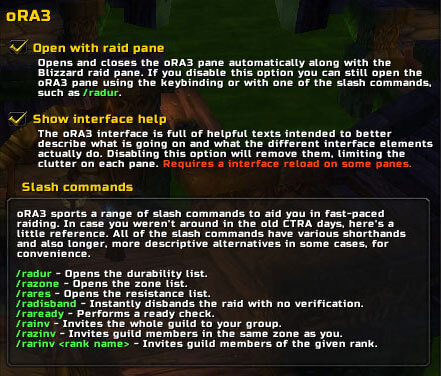
The archive contains Cooldowns, Durability, Invite, Loot, Promote, ReadyCheck, Resistance, Tanks and Zone. Cooldowns receives spell-cooldown reports and displays configurable timer bars; its configuration selects classes and spells, and its code updates around combat-log and spellcast events. Durability and Resistance collect raid status data and expose sortable list views; their chat commands are /radur, /radurability, /rares, /raresist and /raresistance. Tanks maintains a configurable tank list and reacts to group and promotion changes. Zone reports group members' zones.
ReadyCheck provides the raid-ready window and registers /rar and /raready. Invite can invite by guild, zone, rank or configured whisper keywords through commands such as /rainv, /rainvite, /razinv, /razinvite, /rarinv and /rarinvite. Promote manages automatic assistant-promotion rules and can use guild ranks, names or group state. Loot applies the configured loot method when the group starts or changes. The module set is deliberately broader than a single cooldown bar: it covers pre-raid checks, group administration, role lists and selected raid automation.
What the reports mean
oRA3 coordinates information from players who are running compatible oRA3 modules. A missing durability, resistance or cooldown result does not prove that the player has failed the check; the other client may not be running the same module or may not have reported its state. Cooldown bars represent the spells and classes configured in this old build, while the Tanks panel is an assignment list rather than an automatic replacement for the raid leader's decisions. Keep that distinction in mind when using the reports during a pull.
Practical raid workflow
Install the complete archived folder with its libraries, enable the core and modules on every participating 3.3.5a client, and open the oRA panel before a raid. Run a ready check, review the Cooldowns and Resistance lists, and configure the Tanks panel before assigning responsibilities. A raid leader can use Invite or Promote after setting the relevant guild, rank or name rules, while Loot can apply the saved group loot choice when the group changes. During the run, use Zone and Durability as status lists and treat a missing player result as a compatibility or participation signal, not automatically as a failure of the monitor.
The package provides /ora and /ora3 slash aliases for the main addon panel, plus the module commands above. Keep this r452 archive separate from current oRA3 releases: current documentation and modules may require a different WoW API and are not evidence for this Interface 30300 build. Install the extracted oRA3 folder under Interface/AddOns, enable its embedded libraries, and confirm the module folders are present before using the raid checks.