
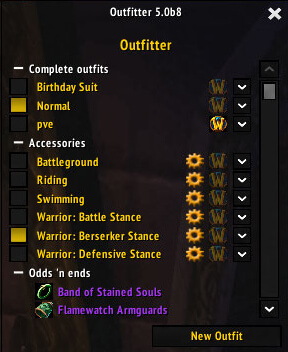
Outfitter is an equipment management addon for WoW WotLK 3.3.5a that lets you create multiple gear sets, called outfits, and quickly switch between them.
It is useful for characters who regularly change equipment for PvE, PvP, different talent specializations, professions, resistance sets, or other situations.
How Outfitter works
Create an outfit from the gear you currently have equipped and give it a recognizable name, such as Tank, DPS, PvP, or Fishing.
You can then switch between saved outfits without manually replacing every individual item.
Outfitter provides several ways to access your sets:
- Outfit bar for quick gear switching
- Minimap menu
- Character equipment interface
- Slash commands
- Keybindings
Some outfits can also use scripts to equip or remove gear automatically when specific situations occur.
Useful commands
To equip a saved outfit:
/outfitter wear OutfitName
To toggle an outfit on or off:
/outfitter toggle OutfitName
For example:
/outfitter wear PvP
Outfitter also supports additional commands for managing saved equipment sets.
Installation
- Download the Outfitter archive.
- Close World of Warcraft.
- Extract the addon into World of Warcraft\Interface\AddOns.
- Start the game and make sure Outfitter is enabled.
- Open the Outfitter interface and create your first equipment set.
If an outfit does not equip correctly, check that the required items are available in your bags and that the saved outfit still contains the equipment you expect.
Outfitter is especially useful for characters who maintain several gear sets and want to switch between them quickly without managing every equipment slot manually.
Before you install
Keep a copy of your current addon folder and saved settings before replacing files. Confirm that the extracted folder is intended for the 3.3.5a client, enable it on the character-selection screen, and test the main feature outside important group content. If the interface behaves unexpectedly, disable unrelated addons temporarily and reload the UI.



