
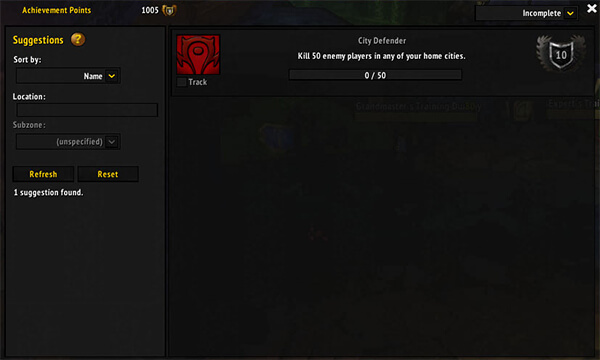
Overachiever is an achievement addon for WoW WotLK that expands the standard Achievements interface with additional search, tracking, and reminder tools. It is useful for players working on exploration, holiday, dungeon, raid, profession, and other achievements.
Main features
Overachiever adds several tools to the default achievement window:
- Search — find achievements by name, description, reward, and other information.
- Suggestions — shows achievements relevant to your current location and active events.
- Watch — create custom lists of achievements you want to track.
- Related — view connections between achievements and meta-achievements.
The addon can also display additional progress information in achievement tooltips and provide reminders when you encounter creatures, items, books, fishing nodes, or other objectives connected to achievements.
How to use Overachiever
Open the normal Achievements window to access the additional Overachiever tabs.
To open the addon options, type:
/oa
You can also quickly search for achievements using:
/ach <keyword>
For example:
/ach cooking
Most Overachiever features can be enabled, disabled, or adjusted from its settings.
Installation
- Download the Overachiever archive.
- Close World of Warcraft.
- Extract the addon folders into World of Warcraft\Interface\AddOns.
- Start the game and make sure Overachiever and its modules are enabled in the AddOns menu.
If the additional achievement tabs do not appear, check that the addon and its included modules were extracted directly into the AddOns folder and are enabled.
Overachiever is especially useful for achievement hunting because it puts search, suggestions, progress information, and custom tracking into the existing achievement interface.
Before you install
Keep a copy of your current addon folder and saved settings before replacing files. Confirm that the extracted folder is intended for the 3.3.5a client, enable it on the character-selection screen, and test the main feature outside important group content. If the interface behaves unexpectedly, disable unrelated addons temporarily and reload the UI.



