
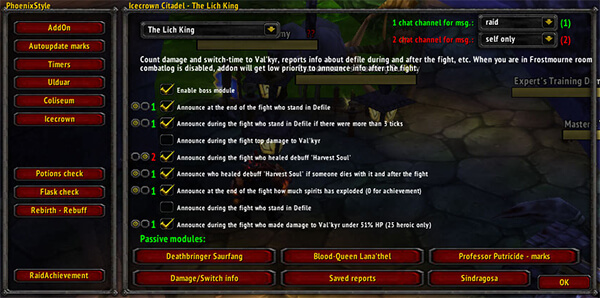
PhoenixStyle is a raid-leader toolkit that tracks supported encounter mistakes and can report saved fail information to chat.
Main features
- boss-mechanic fail tracking.
- saved fight information.
- top or overall statistics depending on module.
- anti-spam reporting controls.
- raid-focused modules and checks.
How to use
Open /ps or /phoenix before raid, enable only the modules relevant to the instance, and review saved information after pulls rather than spamming every event live.
Raid-specific modules
PhoenixStyle is a raid utility with separate encounter modules, including Icecrown, Ulduar and Coliseum content in the supplied archive. Enable the module for the raid being played and configure its alerts or reports before the pull. The module data is encounter-specific, so an Icecrown message should not be expected in Ulduar.
Use the displayed report after the relevant mechanic occurs and compare it with the actual encounter event. PhoenixStyle’s saved variables include module settings; disabling an encounter module removes its checks without removing the core addon. This is a WotLK raid package, not a modern universal boss-mod database.
Enable the encounter module matching the raid, read its alert when the mechanic occurs, and disable unrelated modules. Module-specific warnings are more useful than treating PhoenixStyle as a universal boss database.
The encounter modules are separate. Enable the one matching the current raid and review its alert after the mechanic; an Icecrown module cannot provide reliable Ulduar checks.
Read the module name before relying on an alert. PhoenixStyle separates encounter data so that a warning from one raid is not silently presented as a mechanic from another raid.



