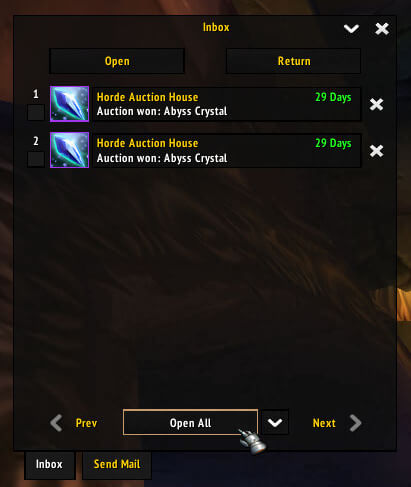
Postal is mailbox enhancement version 3.3.2. Its archive contains OpenAll, Express, Select, BlackBook, TradeBlock, Wire, DoNotWant and Rake modules for batch inbox actions, outgoing mail, recipient history, selection, money handling and filtering.
Using it
At a mailbox, use OpenAll or Select for repeated inbox work, Express for sending items and BlackBook for previous recipients. Review filters before deleting or collecting valuable mail. Ace3 is included or optional.
Mailbox modules
OpenAll and Select handle repeated inbox collection, Express speeds up outgoing item mail, and BlackBook keeps recipient history. Wire covers money handling, while TradeBlock assists with item handling during mail composition. DoNotWant and Rake provide filtering and cleanup controls. Review the selected messages and filters before collecting valuables or deleting anything. Postal is loaded around a mailbox and cannot create mail away from one or bypass server mail rules. The supplied TOC identifies version 3.3.2 and Interface 30300; keep its Ace3/module set together.
What each module changes
Postal works inside the Blizzard mailbox rather than replacing the character's mail rules. OpenAll scans the inbox for collectable messages, while Select lets you choose a subset instead of taking everything. Express changes the outgoing workflow so repeated item sends require less manual setup. BlackBook records recipients used by the character, which is useful when sending the same materials to an alt or guild member.
Wire handles money-oriented mail actions and TradeBlock supports item handling while a message is composed. DoNotWant and Rake are the filtering and cleanup pieces: use them to keep unwanted messages out of the normal collection workflow. Read the selected rows before using a batch action, especially when an inbox contains valuable attachments or COD mail.
Practical mail routine
At the mailbox, first use Select to inspect the inbox, then collect ordinary returns with OpenAll. For a crafting alt, choose Express, select the recipient from BlackBook, and attach the required stack. Use the filter modules only after checking which messages they match. Postal's Interface 30300 release is version 3.3.2; the module folders and optional Ace3 support must come from this archive.