
w-addons.ru: w-addons.ru/addon/power-auras-classic
Power Auras Classic is a condition-based alert addon for the WoW WotLK 3.3.5a client. The attached build is version 3.0.0M with interface version 30300. Instead of replacing the default action bars or unit frames, it watches selected game states and displays an aura near the character when the selected condition matches.
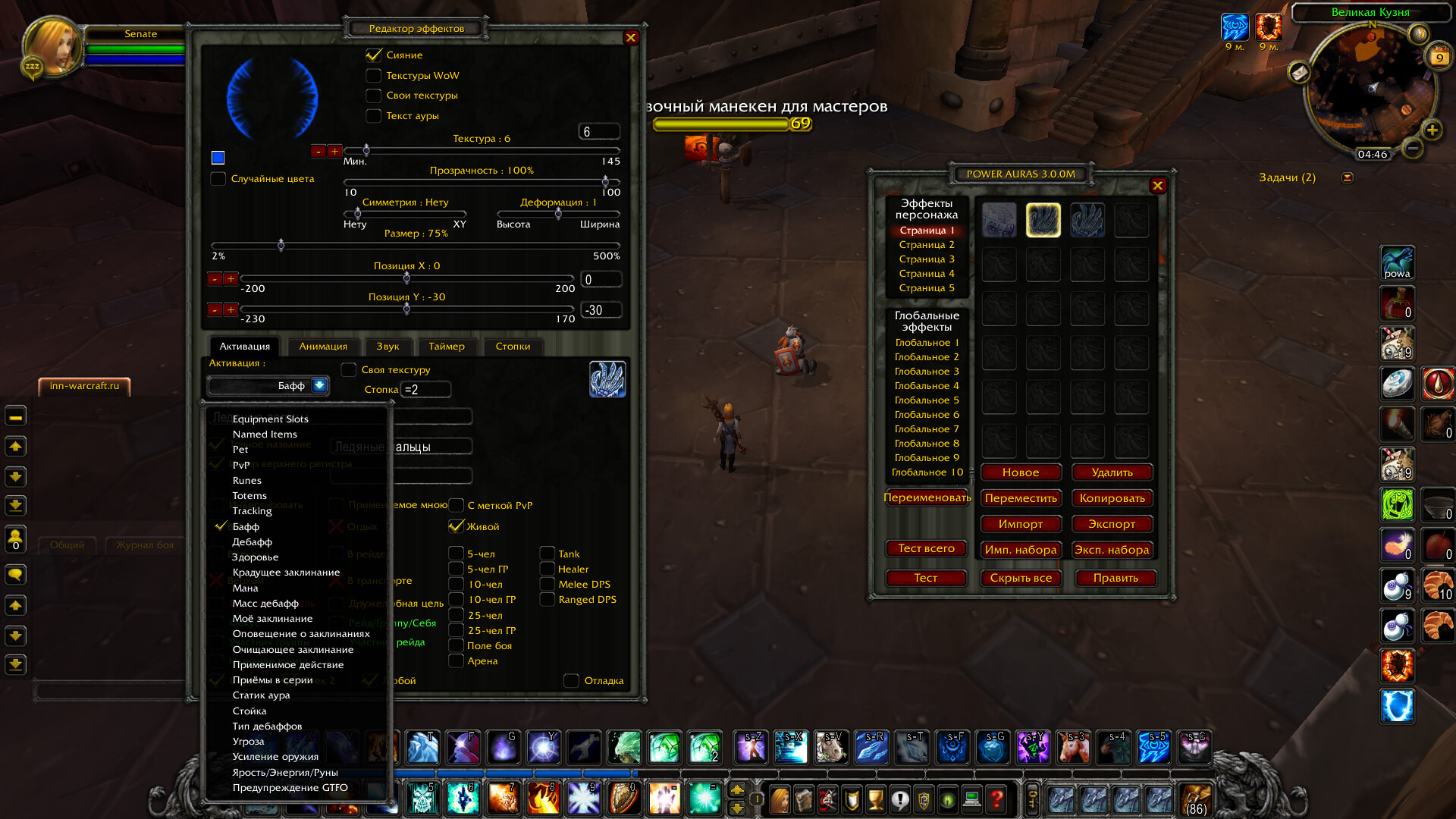
What Power Auras can check
The editor exposes several trigger families. Auras can react to named buffs and debuffs, including stack or duration-related conditions, and can check area-of-effect debuffs, debuff types, weapon enchants, and whether a buff or debuff belongs to the player. The target filters distinguish the player, enemy target, friendly target, party or raid units, and other supported units. This makes the same visual effect usable for a self proc, a debuff on the current target, or a missing effect on a group member.
The build also contains triggers for health and mana thresholds, rage, energy and runic power, combo points, stance or form, aggro, PvP state, totems, pet state, runes, equipment slots, named items, tracking, and the GTFO alert. Other confirmed choices include Action Usable, Spell Alert, My Spell Cooldown, Stealable Spell and Purgeable Spell. These conditions are evaluated by the addon; they are not a modern WeakAuras script system.
Creating an alert
Type /powa to open the Power Auras options window. Create or select an aura, choose the event type, and enter the spell, buff, debuff, item, or other value that should activate it. The editor accepts a name or part of a name for many name-based triggers, and the source also supports spell IDs in the spell field. Use the exact-name option when a partial match would be too broad.
After choosing the condition, select the visual texture or use the relevant spell, buff, or ability icon. The aura editor supports a color, size, position, opacity, and text display. Position can be entered precisely rather than relying only on dragging, which is useful when separate proc, target-debuff, and defensive alerts must occupy predictable areas of the screen.
Animation, timer and sound feedback
Power Auras Classic has beginning, ending, main, and secondary animation settings. Animation speed, duration, opacity, and a spin option can be adjusted so a short proc does not look the same as a persistent warning. A timer can be enabled for supported buff or debuff duration displays, including separate timer selections for player buffs and player debuffs.
The package includes starting and ending sound fields, additional sound choices, and support for custom .wav or .mp3 files that are available before the client starts. A sound is useful for a cooldown or defensive warning that may occur outside the centre of the screen, but it should be used selectively in a raid so several simultaneous alerts do not become noise.
Practical WotLK uses
- For a PvE proc, create a named-buff aura and place it near the action area. When the proc appears, the icon and optional sound identify the short window in which the player should use the relevant ability.
- For a damage rotation, use an Action Usable, resource threshold, combo-point, stance, or My Spell Cooldown trigger when the condition is more useful than a simple buff check. The alert can show when a chosen action is available or when a resource state needs attention.
- For target control, configure a debuff trigger with the enemy-target filter and a duration timer. The aura can disappear when the debuff is gone, making refresh timing easier to read during a boss or PvP target switch.
- For defensive play, use a health threshold, aggro condition, or a known defensive buff/cooldown condition and place it away from offensive proc alerts. This keeps an emergency warning visible without requiring the player to scan every unit frame.
- For dispel or interrupt awareness, the confirmed debuff-type, Stealable Spell, Purgeable Spell, and Spell Alert conditions can be restricted to the relevant target or group filter when the server client exposes the required combat information.
Import, export and saved aura sets
The addon saves aura configuration in its normal global and per-character saved variables, including PowaSet, PowaMisc, PowaTimer, PowaPlayerListe, and PowaState. The editor provides Import and Export for one aura, plus Import Set and Export Set for a group of auras. The manual describes copying an aura string with Ctrl-C and pasting it with Ctrl-V; importing a set replaces the auras on the selected page, so export the existing set first if it must be preserved.
Limitations and troubleshooting
- If an aura never appears, confirm that Power Auras is enabled, the aura itself is enabled, and the selected unit filter matches the event. A self buff, enemy-target debuff, and friendly-target condition are different checks.
- For name-based triggers, verify the spell or buff name and consider the exact-name option. A partial name can match more than one effect, while a localized or server-modified name can prevent the expected match.
- If a duration timer is inaccurate or empty, treat it as an aid rather than a combat-log replacement. The aura still depends on the client seeing the relevant buff, debuff, spell, item, or unit event.
- If an aura is technically active but hard to see, inspect its position, size, opacity, texture mode, and animation duration. Several large animated auras can overlap or obscure one another.
- If imported data is not accepted, copy the complete aura string, use the matching Import or Import Set control, and remember that importing a set replaces the current page. Custom sounds must also be present before the game client loads them.
This is a legacy 3.3.5a build, not a current WeakAuras release. Trigger behaviour can depend on the WotLK client API, localized spell names, custom server spell data, and whether the required unit or combat event is visible to the addon.
Installation
- Extract the
PowerAurasfolder from the archive intoWorld of Warcraft/Interface/AddOns. - At character selection, enable
Load out of date AddOnsif the 3.3.5a client marks the interface as out of date. - Log in, type
/powa, and test one simple aura before importing a larger set.



