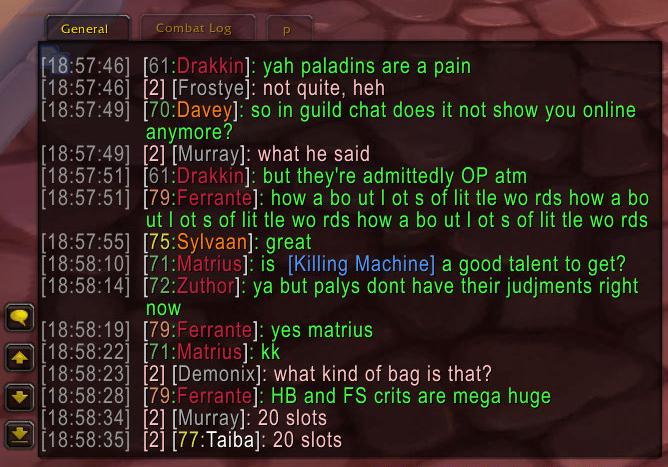
This archive contains Prat 3.0 version 3.3.26 for the WotLK 3.3.5a client (Interface 30300). Prat is a modular replacement layer for the default chat behavior: it adds formatting, history, copy tools and edit-box controls without replacing the chat system with a separate chat application. Its saved settings are stored in the Prat3DB and Prat3PerCharDB variables.
Reading messages more easily
The Timestamps module adds configurable time markers to chat messages. It can show timestamps per chat frame, color the timestamp, use local time, add spacing, and format chat in two columns. ChannelNames changes how channel labels are displayed: it supports channel abbreviations, optional spacing and punctuation, and channel links. This is useful when raid, party, guild and custom channel messages need to be identified quickly in a busy window.
ChannelColorMemory stores channel colors so a channel can keep a recognizable color when the default chat settings would otherwise reset it. PlayerNames can add class and level information when Prat has learned it from the available player data. It also provides name-related handling for chat messages. These formatting modules affect how the message header is presented; they do not change the text sent by another player.
History, filtering and chat windows
The History module keeps chat history so recent messages remain available when a window is scrolled or a chat frame is revisited. ChatFrames, Scroll, Fading, Clear, Tabs and Buttons are display modules that adjust the behavior of the standard chat frames. Filtering and CustomFilters can remove or classify messages according to the enabled filter rules. Filtering should be configured carefully: a rule that is too broad can hide useful raid, whisper or channel information along with unwanted lines.
ChatLog is a separate module for recording chat, while ChannelSticky can keep the last selected channel when replying. The package also includes OriginalEditbox and Editbox modules. They control the appearance and behavior of the chat input area, including the way the edit box is attached to or displayed with a chat frame. Enable only one edit-box approach if the two available implementations conflict with the layout of another UI addon.
Copying links and chat text
UrlCopy detects URLs in chat and provides a way to copy them instead of retyping a link from the chat window. CopyChat copies text from the active chat frame into an edit box, where it can be selected and copied. This is useful for saving a quest or item link, sending a long error message to another player, or reporting a chat line without relying on a screenshot. These tools work on text already present in the chat frame; they do not create a web destination for ordinary item or spell names.
Profiles and configuration
Open Prat's configuration with /prat. The command opens the Prat options window, where modules are grouped by display, formatting and extra functions. Each module has its own enable state and settings, and the core registers AceDB profile options. Profiles allow a player to keep different chat layouts and module choices rather than rebuilding them on every character. A practical first setup is to enable Timestamps, ChannelNames, PlayerNames, History and CopyChat, then add Filtering, Font or Editbox changes only when a specific chat problem requires them.
The Font module controls chat font-related display settings. ChannelNames and Timestamps are useful for compact headers, while History and CopyChat address different needs: one preserves messages for later review and the other extracts text from a selected frame. The package also contains optional modules such as Sounds, PopupMessage, AddonMsgs, EventNames and TellTarget; use them only when their particular event or notification behavior is wanted.
Installation and version limits
Close the game, extract the top-level Prat-3.0 folder directly into Interface\AddOns, enable it at character selection, and open /prat. The archive includes the framework and its module files. Its TOC lists optional libraries and integrations such as LibSharedMedia, LibDataBroker and LibDBIcon; those entries do not mean that every external integration is installed or required for the basic chat modules.
This is an older Interface 30300 build from the Prat 3.0 line. Its module list and available options are limited to the files in this archive, so modern Retail chat features should not be assumed. If a formatting option has no visible effect, first verify that its module is enabled and that another chat addon is not applying a later message or frame modification. If chat becomes cluttered after enabling a filter, disable that filter module or rule and check the affected chat frame again.