
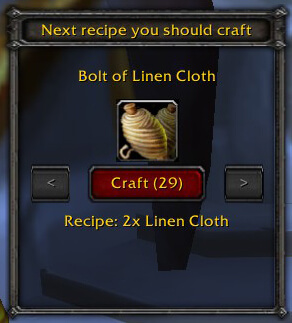
The production archive is Profession Capper v1.0.0-beta16 with Interface 30300. Its README describes a narrow purpose: when a supported profession window is open, the addon calculates which recipe should be crafted next from the character's current skill and the WotLK profession cap of 450. It is a recipe recommendation panel, not a complete profession leveling route or trainer database.
What the panel shows
Profession Capper listens for the trade-skill window to open and reads the profession name, current rank and maximum rank through the WoW trade-skill API. It opens its own movable frame near the bottom-left of the screen. The panel shows the next recommended recipe, the recipe's reagent information and a skill icon. If the cap has already been reached, it changes to a cap-reached message and hides the crafting controls. If the recommended recipe is not learned, the craft control is marked unavailable rather than pretending that the recipe can be used.
Some professions can have more than one calculated option. The left and right buttons move through the available recipe recommendations, so the player can inspect another supported choice instead of following an automatic queue. The source includes a Craft button that calls the normal trade-skill crafting action for the selected recipe; the addon does not automatically choose a full leveling route.
Supported professions
The bundled modules support Enchanting, Tailoring, Blacksmithing, Alchemy, Engineering, Jewelcrafting, Leatherworking, Inscription, Cooking and First Aid. The README marks Herbalism, Mining, Skinning and Fishing as unsupported. That means Profession Capper is useful for supported crafting and secondary professions, but it does not provide gathering-skill progress or recommendations for every profession in the game.
Practical use and limits
Open one of the supported profession windows and read the Profession Capper panel beside it. Use the displayed recipe and reagents to decide what to craft next, or browse the alternate recommendations with the arrow buttons. Once the panel reports that the cap is reached, there is no further recipe recommendation. The source contains no confirmed trainer-location display, skill-up history, profiles, saved profession dashboard or automatic recipe route. The /pcapper slash-command registration controls the panel display; the addon otherwise follows the normal profession-window lifecycle.
Installation
Install the supplied Profession_Capper folder under World of Warcraft\\Interface\\AddOns. The archive already includes the profession modules listed above.



