
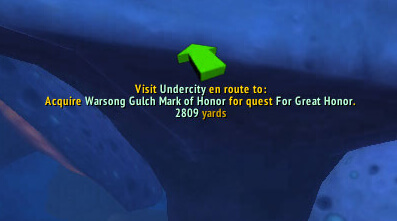
QuestHelper is a questing assistant that marks objectives and guides you through active quests with route suggestions.
Main features
- quest objective locations on the map.
- direction arrow and optional path display.
- route ordering for active objectives.
- settings for which quests and markers are shown.
How to use
Pick up your quests, then follow the suggested next objective. Use /qh settings to reduce clutter and /qh arrow if you want to toggle the directional arrow.
Quest routing in the 1.4.1 package
QuestHelper 1.4.1 calculates a route for active quests and stores route, character and flight-route data in its SavedVariables. The Interface 30300 TOC lists optional integrations for Cartographer waypoints, TomTom, instance maps, Swatter, Tekticles and font libraries. These integrations affect where the route is displayed; they are not all required for the core calculation.
Accept or update quests, open the QuestHelper view, and follow the suggested objective order. The addon uses known quest relationships, objective locations and flight routes to reduce unnecessary travel, but the result is a recommendation rather than a perfect path. Mark an objective complete or abandon an outdated quest when the route becomes stale, then let the addon recalculate. It does not know custom server quest changes that are absent from its database, and a missing map or waypoint dependency can remove the visual arrow while leaving the route data intact.
When the route changes
QuestHelper recalculates from the quests currently known by the character. If a quest is completed, abandoned or replaced, update the quest log before judging the new route. Flight-route knowledge and optional waypoint integrations affect the visible path. The algorithm can recommend an efficient order, but it cannot know a custom server objective that is absent from the 1.4.1 database, so the player should verify the actual quest text and map position.



