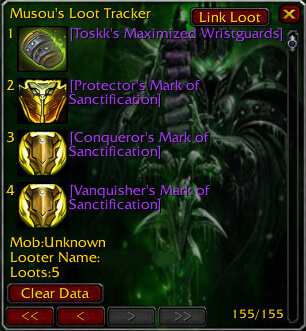
Raid Roll runs raid loot rolls and includes Loot Tracker and EPGP modules. The core stores roll settings, LootTracker shows boss loot and distribution messages, and RaidRoll_EPGP tracks EPGP as a dependent module. The package targets Interface 30300.
Using it
Enable the core first, then add LootTracker or EPGP only when the raid uses that workflow. Use the roll frame for announced items and review roll settings.
Loot modules
Use the core roll frame for an announced raid item and review its saved roll settings. Loot Tracker adds a boss-loot window and distribution messages. RaidRoll EPGP tracks the EPGP workflow and depends on the core. The TOC also stores options for accepting rolls, tracking unannounced rolls, rank display, group numbers, extra width, and roll-frame height. Enable Loot Tracker or EPGP only when that raid uses it. The supplied package targets Interface 30300.
Core, Loot Tracker, and EPGP
The core RaidRoll frame handles the announced item roll and stores the roll-related settings. Its saved variables include controls for accepting rolls, tracking unannounced rolls, showing ranks, rank priority, extra width, group numbers, and roll-frame height. Set those values before a raid and run one low-value test item so the group can confirm how results are announced.
Loot Tracker is a separate module that shows a window containing boss loot and provides configurable distribution messages. RaidRoll EPGP depends on the core and should be enabled only when the raid actually uses the supplied EPGP workflow. Do not enable every module by default: a group that does not use EPGP needs only the core and perhaps Loot Tracker.
The package targets Interface 30300 and carries compatibility metadata for 40000. Its behaviour is tied to the WotLK-era raid-roll UI, so current retail loot rules and later EPGP formats are outside this archive.