
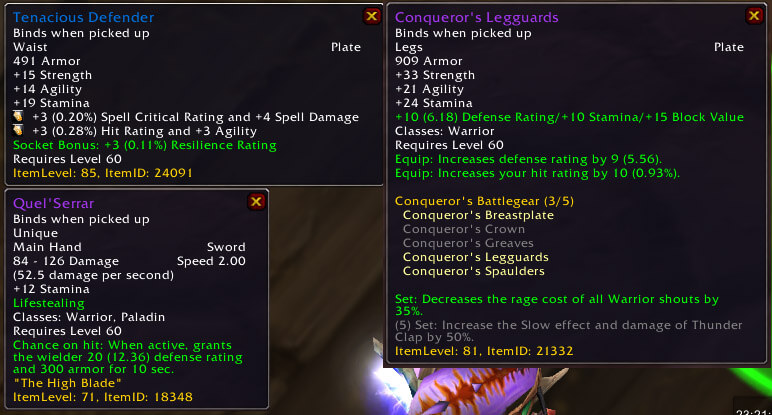
RaitingBuster is RatingBuster converts combat ratings in item tooltips into easier-to-read percentages and derived values.
Main features
- rating-to-percentage conversions.
- additional stat breakdowns.
- automatic tooltip enhancement.
- helps compare what hit, haste, crit, defense and similar ratings actually provide.
How to use
Hover an item and read the converted values. If /rb conflicts with another command on your build, use the alternate RatingBuster command available in the addon.
Reading RatingBuster output
RatingBuster breaks an item tooltip into individual stats and can compare those values with the character context. The Interface 30300 package stores its profile in RatingBusterDB and uses LibStatLogic and LibTipHooker when available. Open an item tooltip, read the added rating lines, and compare two items by the stat that matters for the current class or build instead of relying on the item level alone. TankPoints and dual-spec libraries are optional integrations, not part of every calculation.
The displayed conversion is a WotLK-era stat explanation. It does not decide which item is best, and a rating conversion can be misleading when hit, expertise, defense or a set bonus is the actual constraint. Configure the tooltip sections before comparing gear so the extra lines remain readable.
Use RatingBuster when an item tooltip needs an explicit stat breakdown: inspect the item, compare the converted ratings with the current cap or requirement, and then decide whether the apparent upgrade is real. The addon explains numbers; it does not replace a class stat model.
When comparing two items, inspect the same tooltip type and keep the character specialization unchanged. RatingBuster exposes the arithmetic behind the displayed rating, while the player remains responsible for caps, set bonuses and encounter requirements.
Keep the tooltip breakdown enabled for the item types you actually compare, such as rings, weapons or trinkets. Extra stat lines are informative only when the same rating model and specialization are used on both items.



