
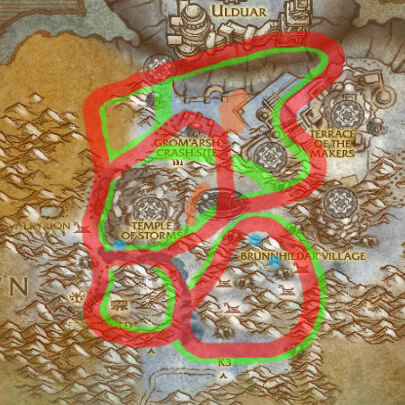
Rare Spawn Overlay 4.2.30300 is the WotLK map-overlay addon by keithgabryelski, distributed through the historical Rare Spawn Overlay project maintained by VallanTV. Its job is narrower than a rare scanner: it shades the areas on the game map where known rare NPCs spawn or patrol. It does not announce a rare, target one, or maintain a live spawn timer.
What the 3.3.5 release contains
The 4.2.30300 package supports the 3.3.5 client and covers Northrend and Outland map data. Earlier releases added the Outland maps, corrected paths such as Gondria's, added creature types to the map legend, and added rare images. The 4.2 update fixed a tooltip and quest-POI issue. The overlay is therefore a reference layer for deciding where to search, not proof that a rare is currently alive at one exact coordinate.
Open the normal world map and use the colored regions and map legend to plan a route through the relevant zone. Hovering the legend can show the rare's image when the package data provides one. A separate scanner such as NPCScan or SilverDragon may be used for alerts, but it is not part of Rare Spawn Overlay and the overlay itself does not perform scanning.
Commands
The historical package documents these controls:
/rso on,/rso off, or/rso toggleenables or disables the overlay./rso show worldmap,/rso hide worldmap, and the correspondingworldlegendorbattlefieldmaparguments control individual map elements./rso configopens the addon configuration.
The WotLK release is a large map-image package and is an old, discontinued addon. The archived project notes compatibility problems with some map replacements, especially Carbonite, and mention that the normal Blizzard world map is the supported reference surface. Install the package under Interface/AddOns, enable it, open the world map, and verify the overlay before relying on it for rare-hunting routes.



