
legacy-wow.com: legacy-wow.com/wotlk-addons/recount/
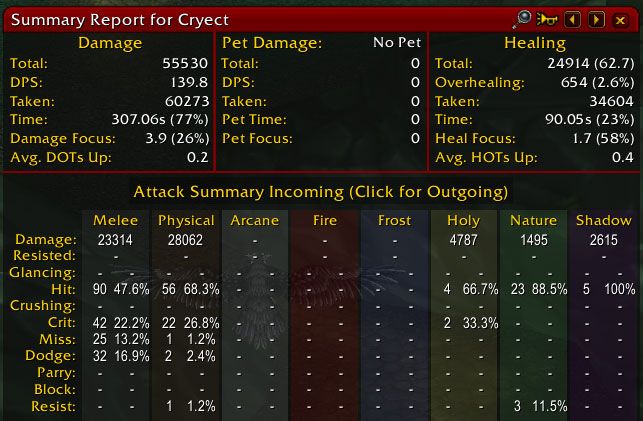
Recount is a graphical combat meter for the WoW WotLK 3.3.5a client. The attached build records combat events and turns them into tables, details, graphs and shareable reports, making it useful for reviewing what happened during a dungeon pull, boss attempt or raid night.
What Recount measures
The main window can show damage done, DPS, damage taken, healing done, HPS, healing taken, overhealing and deaths. The build also contains views for active time, damage or healing time, DoT and HoT uptime, absorbs, friendly fire and power gains. Additional tracker modules cover dispels, interrupts, resurrection events and crowd-control breakers.
Recount can keep pets and guardians associated with their owner. The configuration option to merge pets with owners changes how totals are presented; turn that option off when you need to inspect a pet, totem, gargoyle or guardian separately.
Reading the main window
Start with the data set shown in the window title. Overall Data is the accumulated view, while Current Fight, Last Fight and saved numbered fights let you isolate a particular encounter. Selecting a player and opening details breaks the total down by abilities, targets, hit types, counts and time spent. For damage, this can show which abilities contributed and which targets received the damage. For healing, it can show healing abilities, recipients, effective healing and overhealing.
A left click on a bar opens details. The bar menu also provides graph views; the build supports adding combatants to a graph and opening a realtime graph where that view is available. Graphs are useful for comparing when players were active, when damage or healing stopped, and whether a cooldown or movement period affected the result.
Practical raid and dungeon analysis
- DPS review: select the last boss fight, compare damage and active time, then open ability details instead of treating the final DPS number as the complete explanation.
- Healer review: compare healing done with healing taken, inspect the healing breakdown and check overhealing. Recount’s displayed healing is effective healing; overhealing is tracked separately.
- Death review: use the deaths view to see when a death occurred and inspect the recorded death details. This is useful for checking whether a player died during a repeated mechanic or after a long period without support.
- Raid coordination: use damage-taken, interrupts, dispels, resurrection and active-time views to find avoidable damage or missing utility rather than ranking players from one total alone.
Fight selection, reset and reports
The fight selector lets you switch between overall data, the current or last fight, and saved fight entries. The configuration includes a maximum number of recorded fight segments and an option to keep boss segments. Use the Recount reset control when starting a clean measurement; resetting removes the stored data, so preserve any report you still need first.
Recount can send a selected report to available chat destinations such as say, party, raid, guild, officer, whisper or a chat channel. The report window lets you choose the data mode and the number of top lines to send. Use reports as a compact summary, then use the detail or graph windows when the group needs to understand why a result happened.
Useful commands
/recount show— show the Recount window if it is hidden./recount resetpos— reset the window position when details or the main bar are off-screen./recount config— open the configuration window.
Limitations and troubleshooting
- Results are not a complete performance verdict: DPS depends on the selected fight, encounter length, target availability, movement and segment boundaries. Compare equivalent fights and use details rather than a single ranking.
- Healing needs context: effective healing and overhealing answer different questions. A low total can be correct when little healing was required, while high overhealing is not automatically useful healing.
- Missing pets or guardians: open
/recount configand disable “merge pets w/ owners” when separate pet, totem, gargoyle or guardian entries are required. - Missing detail windows or an invisible bar: try
/recount resetpos. The source also recommends removing duplicate Recount.lua files from the WTF directory when old saved data prevents the UI from appearing correctly. - Stale or incomplete data: verify that the attached Interface 30300 build is enabled and that the relevant recording options are active. Private-server combat-log behavior can affect what Recount receives and records.
Installation
- Download the attached Recount archive.
- Extract the Recount folder directly into
World of Warcraft/Interface/AddOns. - Enable the addon at character selection; allow out-of-date addons if the 3.3.5a client requests it.



