
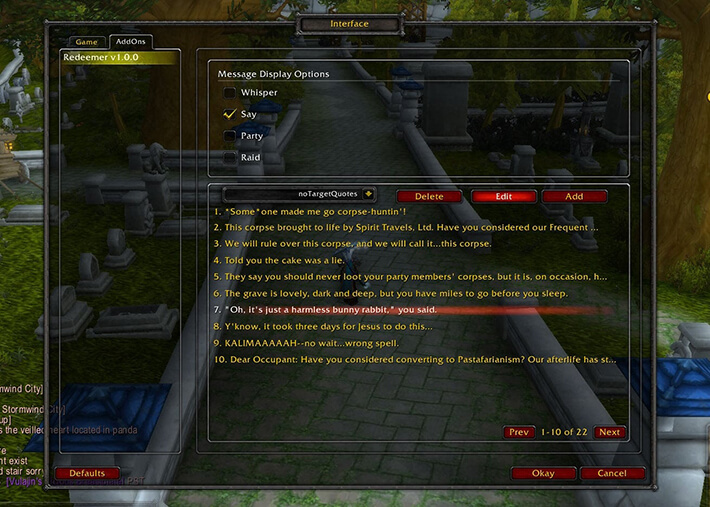
Redeemer is a small resurrection-message addon. The supplied archive is version 1.0, marked for Interface 30300 and updated for the WoW WotLK 3.3.5a client. It does not add a revive button or change the resurrection spell. Instead, it watches the player's spell casts and sends a random humorous quote when a supported resurrection or revive action is cast.
What it detects
The code handles the spell names Redemption, Resurrection, Ancestral Spirit, Revive, Revive Pet, Rebirth, Defibrillate, Raise Dead, Raise Ally and Soulstone Resurrection. The quote pool is selected by the detected spell: for example, Revive Pet uses Hunter quotes, Rebirth uses a combat/druid pool, Defibrillate uses Engineer quotes, and the Death Knight and Warlock resurrection spells have their own pools. When the target is known, %t in a quote is replaced by that target's name.
There is also a separate self-resurrection path for a player who dies with a soulstone: the addon watches PLAYER_DEAD and PLAYER_ALIVE and attempts to post a self-revive quote. The supplied archive calls HasSoulstone(), but does not define that function itself, so this branch is a limitation of the packaged build and should not be treated as guaranteed without testing.
Where quotes are sent
Redeemer stores four per-character switches: Say, Party, Raid and Whisper. By default, Say is enabled while Party, Raid and Whisper are disabled. The command /redeemer say, /redeemer party, /redeemer raid or /redeemer whisper toggles the corresponding destination. The addon sends one group/public destination according to its code priority: Raid when enabled and in a raid, otherwise Party when enabled and in a party, otherwise Say when enabled. Whisper is an additional message to the resurrection target when a target is known; it is not sent for an unknown target.
Practical use
Install Redeemer, decide whether resurrection jokes should remain local to /say or be visible to a party or raid, and toggle the required channel before casting a revive. A priest, paladin, shaman, druid, hunter, engineer, Death Knight or warlock can then use the normal resurrection spell and let Redeemer choose the matching quote automatically. To add or change messages, edit the supplied RedeemerQuotes.lua file and preserve its table syntax; the README documents double quotes, commas, braces and the %t target placeholder. Quotes are code-file content, not an in-game editable list.
Installation and limits
Install the supplied Redeemer folder in Interface\AddOns. The archive has no declared dependencies or modules and saves only the four channel switches per character. It creates no permanent display frame and does not provide a quote editor, profiles, cooldowns, combat resurrection tracking or a general chat automation system. Its spell-name checks and the incomplete soulstone helper are specific limitations of this 3.3.5a build.



