
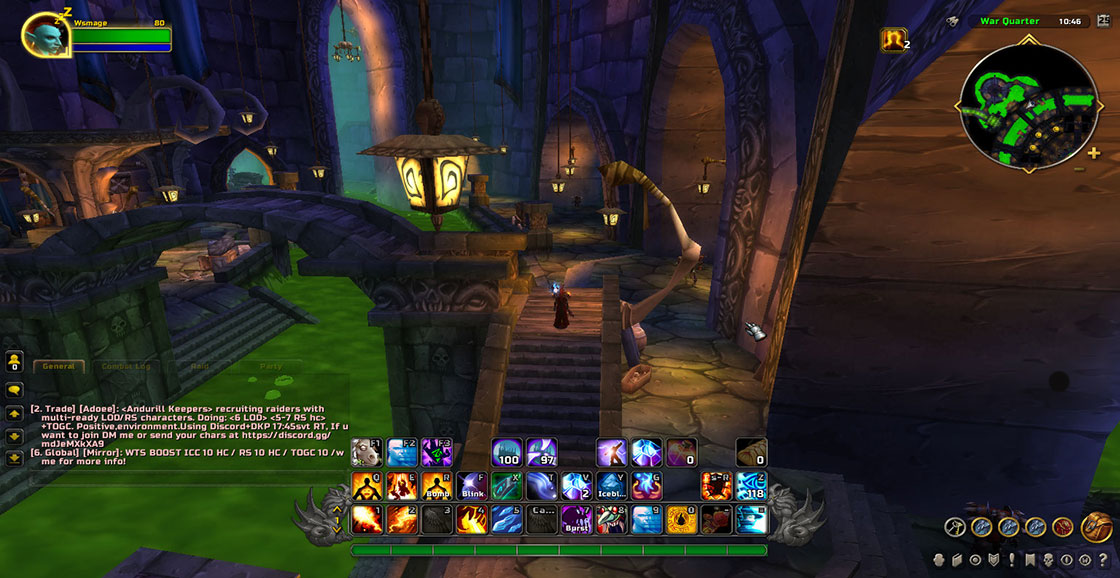
RetailUI 1.1.0 changes selected WotLK frames to resemble a later retail layout. The Interface 30300 package contains ActionBar, UnitFrame, EditorMode, CastBar, Minimap, QuestLog and BuffFrame modules and saves RetailUIDB.
Using it
Enable modules one at a time before combining RetailUI with other frame replacements. It changes presentation only; it does not add retail game systems.
Module workflow
RetailUI's ActionBar, UnitFrame, EditorMode, CastBar, Minimap, QuestLog, and BuffFrame modules change selected frame presentation. Enable one module, reload, and inspect its affected frame before combining it with another replacement addon. RetailUI does not add retail spells or retail game systems. The supplied v1.1.0 package is marked Interface 30300 and stores RetailUIDB; current retail RetailUI instructions are outside this archive.
Testing the module set
RetailUI is a collection of frame modules rather than one replacement with a single switch. ActionBar, UnitFrame, EditorMode, CastBar, Minimap, QuestLog, and BuffFrame each affect a different part of the WotLK interface. Enable one module, reload, and inspect the matching frame before enabling another. This makes it possible to keep the RetailUI action bar while leaving an existing unit-frame addon untouched.
EditorMode and the RetailUIDB profile support the layout choices provided by this old package. If a frame stops responding after another UI addon is enabled, disable one of the two modules that own that frame and reload; RetailUI cannot safely arbitrate every conflict. The package changes presentation and does not add retail spells, systems, or data to the 3.3.5a client.
RetailUI 1.1.0 is marked Interface 30300. Use its included modules and settings together, and do not copy current retail configuration instructions into this release.



