SavedInstances in the supplied archive is version v3.0.1 (r119), marked for Interface 30300 and authored by jokeyrhyme. This is a lockout database for the current character and the other characters whose data has been collected. It uses Blizzard's saved-instance information rather than trying to estimate raid progress from item or combat data.
Per-character lockouts
When the addon refreshes, it reads the saved instances reported for the current character and records locked raids and dungeons in SavedInstancesDB. A record contains the character and realm, instance identity, difficulty information, saved instance ID, and expiration time. Normal and heroic/difficulty-specific entries are shown separately where the client provides that information. The expiration is used to calculate the remaining time before the lockout resets.
Characters are not discovered through an account-wide or server-side service. An alt appears after it has logged in and the addon has refreshed that character's Blizzard instance data. Consequently, an old entry can remain until that character is seen again and the addon cleans or updates its stored data.
Tooltip and daily information
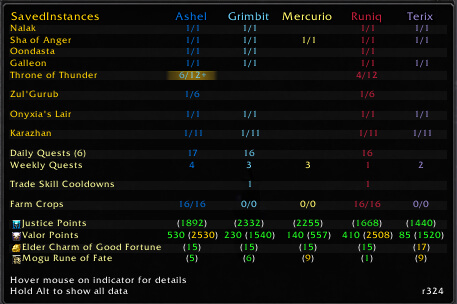
The LibQTip summary presents instance rows with character and difficulty columns, so you can compare a main and alts from one tooltip. Hovering a saved entry can show the instance, difficulty, and exact time left. The archive also supports optional encounter rows in a lockout tooltip when encounter data is configured for that instance. Its combat-log boss-detection code is commented out in this build, so this should not be treated as automatic boss-kill tracking.
SavedInstances can record completion of the random daily dungeon through the LFG reward event and calculate its reset time. This is a specific random-dungeon daily marker, not a general quest tracker or currency tracker. No world-event or currency database is provided by this archive.
Practical use
Log in on each character that you want to monitor, then open the SavedInstances tooltip before a raid or dungeon run. Check whether the needed character already has a saved entry, compare the difficulty, and hover it to see the remaining reset time. The options can control which characters and instances are displayed, category names and spacing, raid-first ordering, encounter visibility, random-daily tracking, recent instance activity, and tooltip history. The bundled LibDataBroker and LibDBIcon support a data display and an optional minimap button; clicking the button opens Blizzard's Raid Info panel.
Installation
Install the supplied SavedInstances folder in Interface\AddOns. The archive includes its required Ace3, LibQTip, LibDataBroker, LibDBIcon, CallbackHandler, and LibBossIDs libraries, so no separate download is required for this package.