
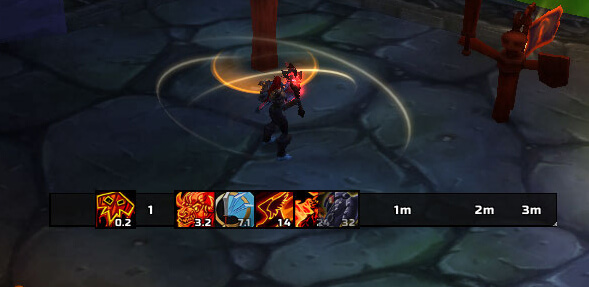
SexyCooldown is a customizable cooldown tracker for WoW WotLK 3.3.5a. It displays cooldowns and other timers on a logarithmic timeline, allowing you to monitor many abilities without filling your screen with separate timer bars.
Long cooldowns are compressed on the timeline, while abilities that are close to becoming ready move more noticeably toward the end of the bar.
What SexyCooldown can track
SexyCooldown can display timers for:
- Spell and talent cooldowns
- Pet ability cooldowns
- Item cooldowns
- Internal item cooldowns
- Buffs on your character
- Debuffs on your character
- Debuffs on your target or focus
- Proc timers
- Totem timers
You can create multiple cooldown bars and decide what information should appear on each one.
For example, one bar can show your major ability cooldowns while another displays short-duration buffs or debuffs on your target.
Customization
SexyCooldown provides extensive control over its appearance.
Bars can be positioned horizontally or vertically and can move in different directions. You can also adjust their size, position, icons, filters, and other visual settings to fit your UI.
Depending on the WotLK build, configuration can be accessed with:
/scc
or:
/sexycooldown
Installation
- Download the SexyCooldown archive.
- Close World of Warcraft.
- Extract the addon into World of Warcraft\Interface\AddOns.
- Start the game and enable SexyCooldown.
- Configure which cooldowns, buffs, and debuffs you want to display.
SexyCooldown is particularly useful when you want to monitor many different timers in one compact part of your interface instead of watching several action bars and buff icons.
Before you install
Keep a copy of your current addon folder and saved settings before replacing files. Confirm that the extracted folder is intended for the 3.3.5a client, enable it on the character-selection screen, and test the main feature outside important group content. If the interface behaves unexpectedly, disable unrelated addons temporarily and reload the UI.



