
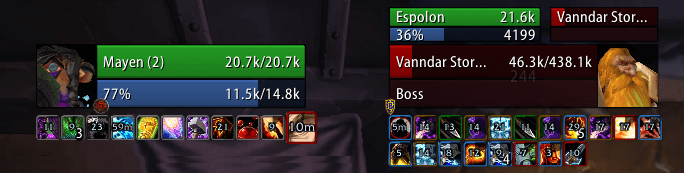
Shadowed Unit Frames v3.2.12 replaces default unit frames with configurable player, target, party and raid frames. Modules cover health, power, auras, cast bars, portraits, range, combat text, combo points, runes, totems, incoming heals, movers and tags. ShadowedUF_Options depends on the core.
Using it
Install core and options, use movers and layouts, and enable only indicators needed by the role. Ace3, LibSharedMedia and LibHealComm are optional or embedded.
Unit coverage
The source lists player, pet, target, focus, party, raid, boss, arena, main-tank, and main-assist units with target variants. Modules add health, power, auras, cast bars, portraits, range, combat text, combo points, runes, totems, incoming heals, movers, and tags. Install the core and options folders together, use movers to place frames, and enable only the indicators needed by the role. The supplied v3.2.12 Interface 30300 options package depends on its core.
Building unit layouts
ShadowedUF keeps a unit list for player, pet, target, focus, party, raid, boss, arena, main-tank, and main-assist units, including target variants. The core can show health and power, while modules add auras, cast bars, portraits, range, combat text, combo points, runes, totems, incoming heals, movers, and tags. These are separate display decisions: a frame can exist while a particular indicator remains disabled.
Install the core and the load-on-demand options package together. Open the options, place the frames with movers, then configure one profile for the player/target pair before expanding to party and raid. A healer can prioritise health, incoming heals, range and auras; a tank can add threat-relevant tags, target-of-target and cast bars. LibSharedMedia changes available fonts/textures, while LibHealComm data is needed for supported incoming-heal displays.
The archive is v3.2.12 for Interface 30300. The options TOC depends on ShadowedUnitFrames, so loading the options folder alone cannot create the core frames. Later profiles and modules should not be assumed compatible.



