legacy-wow.com: legacy-wow.com/wotlk-addons/smartbuff/
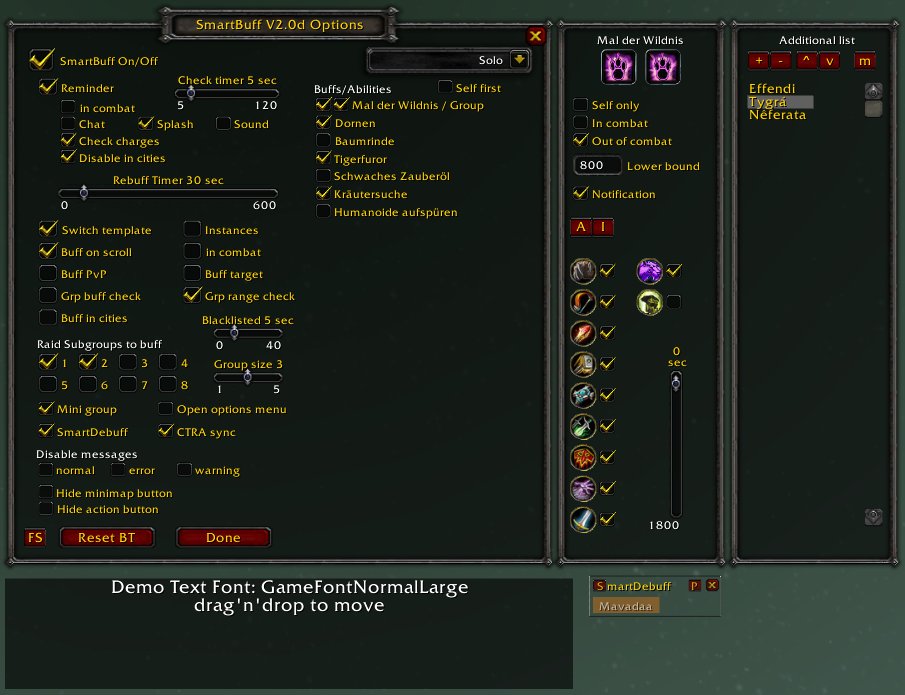
SmartBuff is an automated buff assistant for the WoW WotLK 3.3.5a client. The attached v3.3e build checks the buffs selected in its profiles, reminds you when they are missing or close to expiring, and can cast the configured self, party or raid buffs when the character and target meet the selected conditions.
What SmartBuff checks
SmartBuff keeps separate buff setups for the current character and specialization, then chooses a template such as Solo, Party, Raid, Battleground or Arena. The archive also contains templates for instances including Icecrown Citadel, Trial of the Crusader and Ulduar, plus custom templates. Templates can be switched manually or configured to change when the group type or instance changes.
For each supported spell or buff item, the options determine whether it is used on the player, on selected group members, or both. Class filters, raid subgroup selection, self-only/self-not rules, combat-state rules, main-hand and off-hand options, and a group-buff size threshold control who is considered a valid target. The build also has specific handling for hunter and warlock pets.
Class and group use cases
The supplied buff definitions cover class abilities and consumable-style maintenance relevant to this client, including mage armor and intellect, priest fortitude and spirit, paladin blessings and auras, shaman shields and weapon enchants, hunter aspects, warlock armor and pets, warrior shouts, rogue poisons, druid buffs and tracking abilities. SmartBuff only offers a spell when that spell is available to the character and enabled in the active template; it is not a replacement for choosing the correct buff setup.
For a raid, enable the group versions of the buffs you are responsible for, select the relevant raid subgroups, and set the group-buff threshold so a group spell is used only when enough eligible players need it. For a solo character, use the self settings and leave group casting disabled. A healer, buffer or class responsible for a specific raid utility can keep separate templates instead of changing every buff checkbox before each activity.
Reminders and buff timers
SmartBuff checks the selected units and compares their current auras with the configured buff list. Missing buffs can be shown in chat, as a splash message in the middle of the screen, or with a sound. The rebuff timer controls how many seconds before expiration a reminder appears. The buff setup also supports per-buff reminders, and the build can warn when a charge-based buff is running low.
The interface can use a scroll-wheel action, target changes, or the selected target as triggers when those options are enabled. A friendly current target can be buffed first, while the “self first” setting prioritizes the player. SmartBuff can also synchronize buff time information from other players through its UI synchronization option, but the quality of that information depends on the compatible UI data available to the group.
Practical workflow
- Open the options with
/sbmand select the template that matches the current activity. - In the buff setup, enable only the self or group spells that your character should maintain, then choose eligible classes and raid subgroups.
- Set the rebuff timer and reminder outputs. For raid buffs, review the group-buff size and range checks before relying on automatic casting.
- Before entering a dungeon or raid, trigger a check and resolve missing buffs while there is time to collect reagents, move into range, or change the template.
- During a long session, treat SmartBuff’s reminders as a queue of actions: check the named target, range, resource and reagent before assuming the cast failed.
Commands and key bindings
/sbo,/sbuffor/smartbuff— SmartBuff command entry points./sbm— open or hide the SmartBuff options menu./rui— reload the UI.- The addon exposes bindings named Trigger, Target, Options and Reset Buff Timers. Assign the keys in WoW’s key-binding interface rather than assuming a default key.
Limitations and SmartBuff-specific troubleshooting
- “Nothing to do” or no cast: check that the buff is enabled in the active template, the target is eligible, the character has enough mana, rage or energy, and the required reagent or item charge is available.
- Out-of-range warnings: group and raid members must be within the relevant buff range. Use the subgroup and advanced range checks to avoid treating a distant player as a failed cast.
- A buff is not refreshed: check the per-buff reminder, rebuff timer and combat-state settings. A rule may allow the spell outside combat but not inside combat, or the reverse.
- Self-casting fails: the build includes a compatibility mode specifically for problems casting buffs on yourself. Use it only when normal self-casting fails, because the addon labels it as a compatibility fallback.
- Hunter or warlock pet is missing: enable the corresponding pet option and check that the selected template includes the relevant pet buff.
- Shapeshift or combat behavior differs: the build has separate options for in-combat and shapeshift casting, and its in-combat logic is deliberately limited. Do not assume every configured group buff can be cast during combat.
Installation
- Download the attached SmartBuff archive.
- Extract the SmartBuff folder directly into
World of Warcraft/Interface/AddOns. - Enable the addon at character selection; allow out-of-date addons if the 3.3.5a client requests it.