
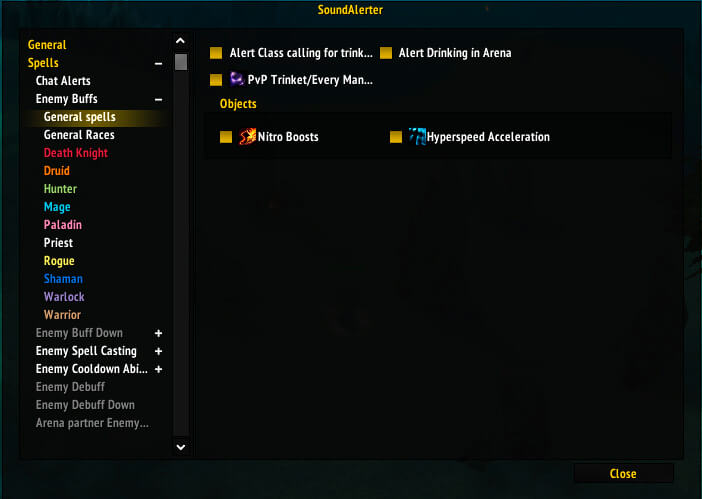
SoundAlerter is a PvP addon for WoW WotLK 3.3.5a that plays audio alerts when enemy players use important abilities.
It is designed to improve awareness in Arena and Battlegrounds by announcing dangerous cooldowns, crowd control, defensive abilities, and other important combat events without requiring you to constantly watch every buff and cast bar.
Main features
SoundAlerter can provide alerts when enemies:
- Cast or use important abilities
- Activate defensive cooldowns
- Use crowd control
- Use other important PvP abilities
- Lose certain temporary effects or defensive abilities
The addon can be configured to work only in selected PvP situations.
It also includes a Target and Focus only option. This helps reduce unnecessary alerts in Battlegrounds by focusing primarily on players you are actively tracking.
SoundAlerter can also provide chat alerts in Arena, Battlegrounds, and party groups.
Configuration
Open the SoundAlerter settings with:
/soundalerter
or:
/salerter
The addon can also use:
/sa
although this shortcut may conflict with other addons using the same command.
From the settings you can choose where SoundAlerter should be active and adjust which alerts you want to hear.
Installation
- Download the SoundAlerter archive.
- Close World of Warcraft.
- Extract the SoundAlerter folder into World of Warcraft\Interface\AddOns.
- Start the game and make sure SoundAlerter is enabled.
- Open the settings and configure the alerts for your preferred PvP modes.
SoundAlerter is most useful for Arena and Battleground players who want immediate audio information about important enemy abilities.
Before you install
Keep a copy of your current addon folder and saved settings before replacing files. Confirm that the extracted folder is intended for the 3.3.5a client, enable it on the character-selection screen, and test the main feature outside important group content. If the interface behaves unexpectedly, disable unrelated addons temporarily and reload the UI.



