
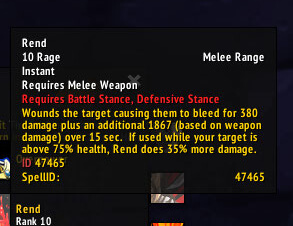
SpellID 1.01 adds numeric spell IDs to supported in-game tooltips. The Interface 30300 package by Silverwind contains core tooltip code and declares no dependency or slash command. It identifies spells only; it does not alter cooldowns or combat behavior.
Using it
Hover a spell in the spellbook, action bar or supported tooltip and use the displayed ID when checking spell data or configuring another addon.
Tooltip behaviour
SpellID reads a spell link or tooltip spell and adds a line labelled SpellID. Hover a spell in the spellbook, action bar, or another supported tooltip to copy the number into a macro or another addon configuration. It does not alter ranks, cooldowns, combat events, or item IDs. A custom tooltip that does not use the hooked Blizzard handlers may not receive the extra line. The archive is version 1.01, Interface 30300, with no documented command or settings panel.
Where the ID comes from
The core hooks tooltip spell information and checks the spell link before adding the numeric line. This makes the result useful when a macro, guide, or another WotLK addon asks for a spell ID rather than a spell name. A spell shown by the normal spellbook or action-bar tooltip is the best test case. Hover it, wait for the tooltip, and read the added value before copying it into configuration.
SpellID is deliberately narrow. It does not scan the entire spell database, change ranks, calculate cooldowns, or attach IDs to arbitrary items. If another addon supplies a custom tooltip frame, that frame may not call the hooked tooltip methods and the line may be absent. There is no slash command, saved setting, or external dependency in the supplied 1.01 Interface 30300 archive, so troubleshooting begins with testing a Blizzard tooltip and confirming the addon is enabled.



