
TellMeWhen 1.2.5 provides configurable icons for cooldowns, buffs, debuffs and reactive abilities. The readme confirms ready or unavailable cooldown conditions, present or absent aura conditions, combat-only visibility and customizable icon size, position and count. LibStub and ButtonFacade are optional.
Using it
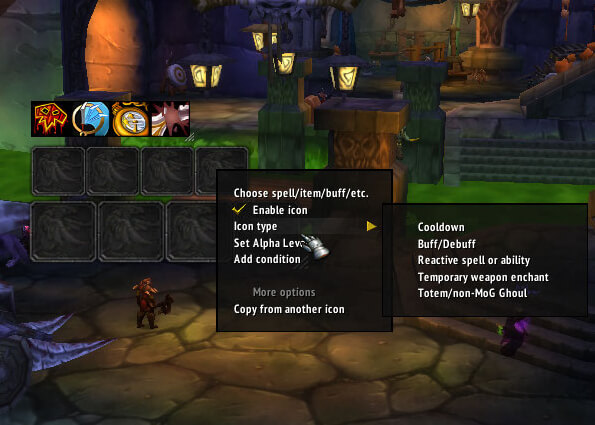
Type /tellmewhen or /tmw to unlock, right-click an icon to configure it, then lock the addon before combat.
Icon conditions
Create an icon for a spell, item, buff, or debuff by name or ID. Cooldown icons can show when an action is usable or unusable; aura icons can show when an effect is present or absent. Reactive abilities have separate conditions and supported timers. Use /tellmewhen or /tmw to unlock, right-click an icon to configure it, drag supported spells or items onto icons, and lock the groups before combat. This is the supplied 1.2.5 Interface 30300 package.
Making an icon useful
Choose the thing to monitor by spell, item, buff, or debuff name or ID, then decide when the icon should be visible. A cooldown can show while usable or unusable; a buff/debuff can show while present or absent; a reactive ability can use its own show condition. The icon menu also exposes target, target-of-target, focus-target, pet-target, stance/form/presence, combat-only, and timer-related values documented by this release.
Use /tmw to unlock the groups. Right-click an individual icon to open its settings, drag a spell or item onto a supported icon, and move or resize the group while it is unlocked. Lock the group before combat so clicks do not move the frame. A practical healer setup is one icon for an important cooldown, one group for a dispel-related debuff, and a timer enabled only where the 1.2.5 code supports it.
TellMeWhen 1.2.5 targets Interface 30300 and stores per-character settings. A buff texture not yet known to the client may show a pocketwatch placeholder until the character encounters that effect. LibStub and ButtonFacade are optional in the supplied archive.



