
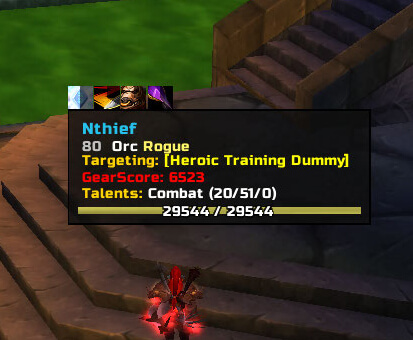
TipTac is a tooltip customization addon that changes positioning, appearance and the information shown in game tooltips.
Main features
- custom tooltip anchor, scale and styling.
- additional unit or item information depending on modules.
- consistent tooltip positioning across the UI.
- optional IDs and target details in some WotLK builds.
How to use
Open /tiptac and first set the tooltip anchor and scale. Add extra information gradually so the tooltip remains readable during combat.
Tooltip layout and information
TipTac 10.05.01 replaces the default tooltip presentation with a configurable frame. The package also includes TipTacTalents, which adds talent specialization information, TipTacItemRef for improved item-reference tooltips, and TipTacOptions for the configuration panel. The main addon stores settings in TipTac_Config and all modules are marked Interface 30300.
Open TipTac options and choose the anchor, scale, border, background, font and visibility behavior that suits the screen. Enable the talent module only if the extra specialization line is useful, and configure item-reference behavior separately from unit tooltips. A practical setup is to move the tooltip away from the character frame, enable unit information, then test an item link, a unit hover and a spell tooltip. TipTac changes presentation and information gathering; it does not change the item or unit data supplied by the client.
TipTac’s anchor and visibility settings matter more than adding every optional line. Keep the tooltip readable near the cursor for combat, or place it at a fixed screen anchor for inspecting gear. Test unit, item-reference and talent tooltips separately because TipTacTalents and TipTacItemRef are separate modules with their own load conditions.
TipTacTalents is optional and should be enabled only when the inspected specialization line is useful. TipTacItemRef handles item-reference tooltips separately, so an item-link problem does not necessarily indicate that the main unit tooltip configuration is broken. Configure and test each tooltip type independently.



