
TradeSkillMaster v2.8.3 is the core of the archived WotLK 3.3.5a economy suite. The production archive declares Interface 30300 and contains the core plus modules for Accounting, AuctionDB, Auctioning, Crafting, ItemTracker, Shopping and Warehousing. It also contains Mailing and Destroying directories, but those two module TOCs declare Interface 50400; this particular archive therefore should not be treated as a fully working modern TSM suite on a 3.3.5a client.
How the verified package is organized
The core supplies the shared database, groups, operations, prices, item data, inventory handling, tooltips, GUI and module API. The modules use that common item and group model rather than acting as unrelated auction windows. AuctionDB stores auction scans and calculates market values. Auctioning uses those values and group operations to manage posting, cancelling and resetting auctions. Shopping provides an item-list interface for finding and buying listings. Crafting adds a profession view and crafting queue based on recipes and reagent data. ItemTracker records items across the places supported by this old client build, including character inventories and other tracked locations. Warehousing is designed to move predefined groups between bags, bank and guild bank. Accounting records gold flow, sales and purchases for later summaries.
Groups and operations
Groups are the organizing layer: items are assigned to groups, and the relevant auctioning, shopping or crafting operation is attached to that group. A group can therefore describe both what an item is and how TSM should handle it. This is important because TSM does not decide a safe price merely from the addon name. Define a small group first, attach only the operation needed for the task, then inspect the resulting price, stack size and quantity before committing to a post or purchase. The archived code and TOCs identify the modules above; they do not justify importing features from current Retail TSM.
Auction and shopping workflow
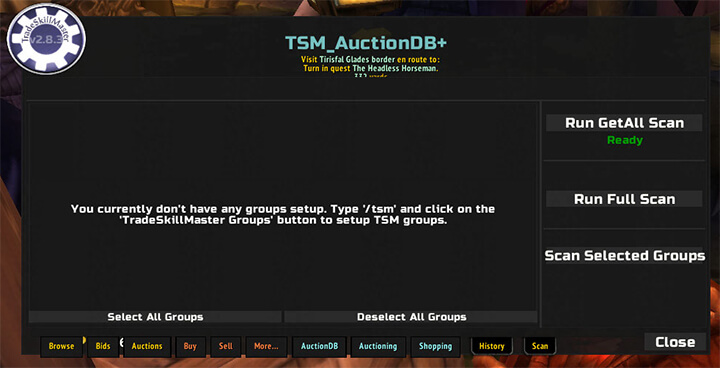
Start with one group of trade materials. Run an AuctionDB scan from the auction interface and allow the build to populate its local market data. Use Shopping to search for the group or a specific item, compare the available listings, and buy only after checking the displayed price and quantity. For selling, configure the Auctioning operation with the pricing and stack behavior exposed by this build, then run a controlled post scan. The Auctioning module is also intended to manage cancellation or reset work; review the results instead of assuming that every listing should be reposted.
Crafting and inventory workflow
Open the Crafting view for a profession, check the recipe and reagent information, and queue a small batch. Compare the displayed material cost with the expected sale value before producing a large amount. ItemTracker helps when materials are spread across character inventory or other tracked locations. Warehousing can move predefined groups between bags, bank and guild bank, which is useful before a crafting session or an auction scan. Accounting then provides the historical view of gold flow, purchases and sales so the result can be compared with the original pricing decision.
Compatibility and installation
Extract the supplied archive so the core and only the compatible Interface 30300 modules sit as separate folders in Interface/AddOns. Enable the core and the desired 30300 modules together; do not assume that the Interface 50400 Mailing or Destroying folders will load on the target client. The core exposes the TSM configuration interface and the archived package documents /tsm as its main command. This is the production archive's older v2.8.3 backport, not the later v4.x WotLK forks or Retail TSM. Keep the exact module set together and verify the TOC interface number before enabling an optional module. The public WotLK backport repository documents a different v4.14.66 package with a broader module set, so it is useful as historical context but must not be used to silently replace the production archive's feature list.



