
WeakAuras is a powerful customizable alert framework for tracking almost any combat state through icons, bars, text and groups.
Main features
- buff and debuff tracking.
- cooldowns, procs and resources.
- boss-mechanic alerts.
- custom conditions and groups.
- import and export strings.
How to use
Open /wa, import or create one aura, verify its trigger in game, and avoid loading large packs you do not understand or need.
WeakAuras 4.0.0
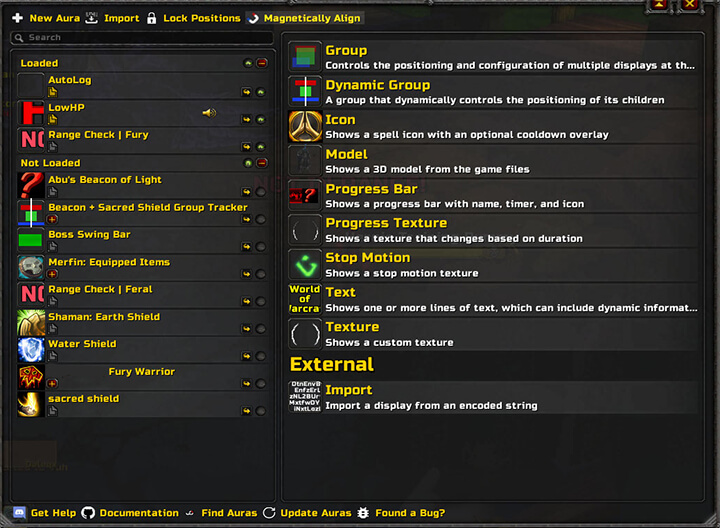
The supplied package is WeakAuras 4.0.0 for Interface 30300, with WeakAurasOptions, Archive and ModelPaths modules. It stores displays in WeakAurasSaved and lists Ace3, LibCompress, LibSharedMedia, Masque, GTFO and range libraries as optional integrations. Create a display in the options panel, choose a supported display type, then configure a trigger such as a buff, debuff, cooldown, cast or other event available to this build.
Use conditions to change visibility, color or text when the trigger state changes, and group related displays when a fight needs several indicators. Export or import through the version’s own options only; modern WeakAuras 5 strings and trigger fields are not assumed compatible. A practical example is a debuff icon that appears on the player, changes color when the remaining duration is short and hides after the aura is removed. Test the trigger with the real spell and unit before relying on it in a raid.
Start with one display: choose an icon or bar, configure a buff/debuff/cooldown trigger, set its unit, then add a condition for remaining time or color. Group displays only after each trigger works alone. WeakAuras 4.0.0 exports are version-specific, so modern 5.x import strings should not be assumed to load.
For a raid display, create the trigger first, choose the unit and spell, then configure the icon or bar and its condition. Export only with the 4.0.0 options in this archive; modern import strings may reference fields this build does not have.
Groups and regions are useful when several related icons should move together, but each child trigger should be tested independently. The Archive module stores saved aura data separately from the core display set. Optional LibSpellRange and LibRangeCheck support range-dependent conditions when the supplied libraries are enabled; their absence can make a range trigger unavailable without breaking ordinary buff or cooldown triggers.



