
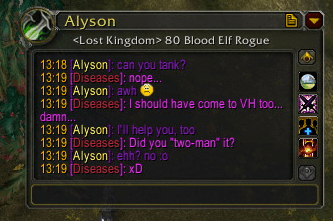
The production archive is WIM (WoW Instant Messenger) version 3.3.7 with Interface 30300. It turns incoming and outgoing whispers into separate messenger-style windows while keeping the normal WoW chat available. The archive includes WIM's window, whisper, history, tab, sound, timestamp, URL and minimap modules; its optional libraries are bundled in the package.
Whisper windows and tabs
When a whisper arrives, WIM creates or opens a conversation window for that character. Replies are sent from the same window, and separate conversations remain associated with their respective players instead of being mixed into one chat frame. Multiple open windows can be organized through the tab system, with sorting and optional groups for whispers, friends and guild members. The window can be moved and resized; settings also control default width, height, scale, alpha and fade/animation behavior.
The conversation header can show character details and class information when WIM's lookup data is available. Class coloring and class icons are supported by the included skin and window code. WIM handles normal whisper events and also formats away and do-not-disturb responses; it does not claim to replace the server's AFK/DND state or automatically answer on the player's behalf.
History and display options
The History module stores whisper messages in the saved variable WIM3_History, organized by realm, character and conversation. This allows a player to reopen a previous conversation after a logout, subject to the configured history limits and automatic age cleanup. A history button in the window opens the History Viewer, and recent history can optionally be previewed when a conversation window is created. The package also has separate chat-history support for enabled guild, party, raid, battleground, say, world or custom chat categories.
Optional display modules add timestamps, clickable URL handling and configurable incoming/outgoing sounds. The minimap button can flash for unread conversations; left-click shows unread windows, while its context menu provides actions such as showing or hiding windows, opening the History Viewer and opening options. These features reduce the need to search through the standard chat frame, but WIM remains a client-side conversation organizer rather than a message archive shared between accounts.
Practical use and commands
Install WIM, let a whisper create its window, reply there, and use tabs or the minimap alert to return to other conversations. Open options with /wim options; /wim help lists the build's registered commands, including /wim history for the History Viewer, /wim addon_messages for addon-message handling and /wim rl to reload the UI. Install the supplied WIM folder under World of Warcraft\\Interface\\AddOns; the archive already contains its libraries, modules, localization and default skin.



