
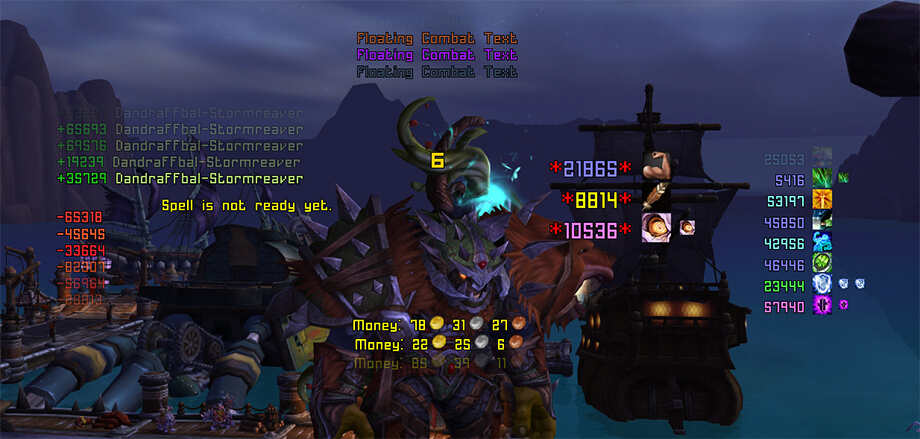
xCT+ is a lightweight scrolling combat text replacement with separate areas for incoming and outgoing combat events.
Main features
- damage and healing text.
- crit, miss, absorb and proc events.
- custom fonts and scroll areas.
- filters for reducing combat-text spam.
How to use
Use /xct to unlock and position the scroll areas, then hide events you do not need so important combat feedback remains readable.
Practical tip
Configure the addon around decisions you actually make during play. A small, readable setup is usually more useful than enabling every optional alert, panel or statistic. After changing settings, reload the UI if the build requires it and verify that the information remains visible at your normal resolution and UI scale.
Combat text routing
xCT+ 3.7.1 replaces and extends the default Floating Combat Text output. The Interface 30300 package stores its configuration in xCTSavedDB and presents combat events in configurable scrolling areas instead of leaving every message in Blizzard’s default stream. The important distinction is that xCT changes presentation and filtering; it does not change combat-log events or damage calculations.
Open the xCT options and configure the message groups you want to see, such as your damage, healing, incoming damage, buffs, debuffs or resource changes. Put high-priority information in a readable area and disable noisy groups that duplicate a raid frame or cooldown display. Test the layout on a training target and in a group, because the volume of incoming events changes sharply between solo play and a raid. The package is the WotLK xCT+ build and should not be treated as the current Retail combat-text system.
Separate outgoing and incoming groups when configuring a raid layout. Keeping them in different scroll areas makes it possible to see a personal proc or incoming damage without losing the event in a combined stream. The saved database belongs to xCT+, so changing an unrelated combat-text addon will not change xCT’s filters.



