
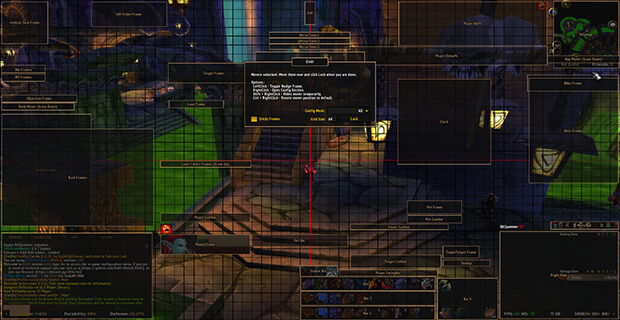
ElvUI is a complete interface replacement that redesigns unit frames, action bars, bags, chat and many other parts of the WoW UI.
Main features
- integrated unit frames and action bars.
- bag and chat replacements.
- nameplates and data panels depending on build.
- profiles and layout sharing.
How to use
Run the initial setup, choose a basic role layout, then change one module at a time. Back up your profile string before major edits.
ElvUI 6.08 modules
The supplied ElvUI package is a WotLK Interface 30300 build, version 6.08. It contains the core UI, ElvUI_OptionsUI, CustomTags, Enhanced, AddOnSkins, ProjectZidras and SwingBar modules. Core settings are stored in ElvDB and ElvPrivateDB, with character data in ElvCharacterDB. The package replaces several Blizzard presentation layers: unit frames, action bars, chat, bags and data text elements are configured through the ElvUI options panel.
Open the ElvUI configuration, choose a module such as UnitFrames, ActionBars, Chat, Bags or DataTexts, and change one layout element at a time. Use Movers to place the resulting frames, then save a profile for the character or role. Enable only the modules shipped with this archive; modern ElvUI options and skins should not be copied into this 6.08 backport. If a feature is absent, it may belong to a separate package module rather than the core.
Build the interface in stages: configure UnitFrames and ActionBars, position them with Movers, then configure Chat, Bags and DataTexts. Save a profile after each stable stage and keep the supplied 6.08 modules together; mixing a later ElvUI module can produce missing options or incompatible saved variables.
ElvUI’s profile workflow matters because the core, options and plugins share saved variables. Create a clean profile, configure the movers and modules, then copy only the profile data that belongs to this 6.08 package. Do not import a current Retail profile.



